


MyNovant
4.3304.00 Reviews
App Specs
- Version
- 7.2.0
- Updated On
- License
- Free
- Downloads
- 100,000+
- Developer
- Novant Health
- Categories
- Medical
- Platform
- Android
Screenshots
 Analysis by AppCompare
Managing healthcare is rarely difficult because of one dramatic task. It is difficult because test results, appointments, messages, and follow-up plans arrive at different moments, often when I am already busy or worried. MyNovant is designed to bring those parts of a Novant Health relationship into one mobile place. After using it as a medical app, I found its value less about novelty and more about reducing the number of small administrative steps between a patient and their care.
The app is free, rated for Everyone, and developed by Novant Health. Its purpose is straightforward: help patients see test results, arrange appointments, remain connected with their care team, and keep track of personal health tasks. That focus makes it more useful for people who already receive care through Novant Health than for someone looking for a general wellness tracker or an independent symptom checker.
My overall impression is positive, but measured. A healthcare app deserves more scrutiny than an ordinary utility because the information involved is personal and sometimes emotionally sensitive. I therefore paid attention not only to whether the main tools were convenient, but also to how clearly the app lets a user make choices, review information, and decide when a mobile screen is appropriate and when direct clinical help is better.
What MyNovant is really useful for
I find MyNovant most useful when I treat it as a dependable starting point for routine Novant Health tasks, rather than a place to manage every aspect of my health. A small habit—checking the app at a planned time, then noting what needs follow-up—can make results and appointments easier to handle without turning every notification into an interruption. The next section looks at how to make that routine more deliberate.
A practical front door to Novant Health care
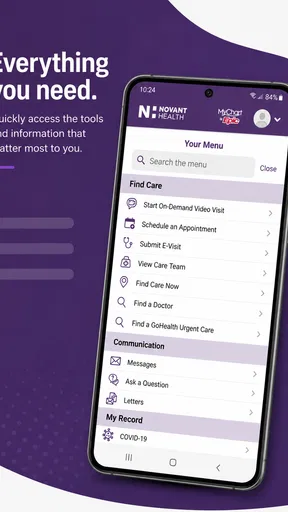
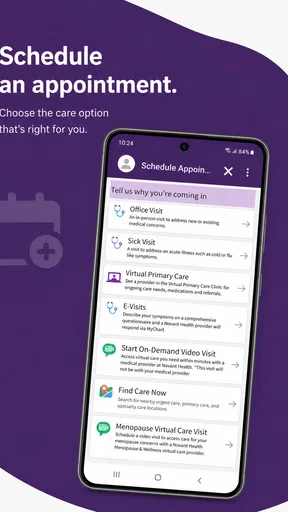
The strongest part of MyNovant is that it connects routine care activities instead of treating them as separate errands. If I need to check whether a result is available, look for an appointment, or stay in contact with the healthcare organization, I can begin in the same app rather than moving between unrelated services.
That convenience matters most during ordinary weeks. A patient may remember a scheduled visit while commuting, notice a result notification after work, or need to revisit information before speaking with a clinician. A centralized app does not replace the healthcare team, but it can make those moments less dependent on memory and paper notes.
The developer is Novant Health, so the app’s usefulness is naturally tied to that health system. This is not a universal medical record designed to gather information from every provider a person has ever used. If most of your care happens elsewhere, the app may have limited relevance even if its interface appeals to you.
Worth Reading Before You Choose

EA SPORTS FC Mobile 26 Is a Bigger Football Game, but It Takes Time

Flipboard Shows What News Apps Must Do Beyond the Feed

Switching to Android Auto Means Rethinking Your Driving Routine

Google Calendar Makes a Crowded Week Easier to Manage

Ludo King Makes the Most of the Minutes Between Plans

Baby Panda World Brings Quick Play to Modern Phones, but Its Game Library Feels Busy
Results are helpful, but context still matters
Seeing a test result quickly can be reassuring, but it can also create unnecessary anxiety when a number appears without the explanation a clinician would provide. I consider the results area useful for staying informed, not for diagnosing myself. A result is one piece of a medical conversation, and the app should not encourage me to treat an isolated value as a final answer.
A sensible workflow is to open a result when I have enough time to read it calmly, note any question that comes to mind, and use the appropriate communication or appointment route if clarification is needed. That is a better use of the app than repeatedly refreshing it or searching the internet for an interpretation that may not fit my situation.
This is one of the less obvious trade-offs of digital access: faster visibility is not the same as faster understanding. MyNovant can shorten the wait for information, while the meaning of that information may still require a professional discussion.
Appointments are easier when preparation starts early
The appointment function is most valuable when I use it as part of a preparation routine rather than as a last-minute booking tool. Before choosing a visit, I would write down the reason for the appointment, gather relevant questions, and check whether the timing gives me enough space to follow through. The app can support the scheduling step, but it cannot decide what information the clinician needs to hear.
For recurring care, a mobile appointment view can also reduce the chance of overlooking a visit. I found it more useful to check upcoming care at the start of the week than to open the app only when I was already late or uncertain about the details. This small habit turns the app from a passive record into a planning aid.
There is a practical limitation here. A digital booking flow can feel faster than calling, but it may not be the best route when the situation is complicated, urgent, or difficult to describe through a standard appointment process. In those cases, direct contact with the appropriate healthcare service is the safer choice.
Staying connected without making the phone the whole care plan
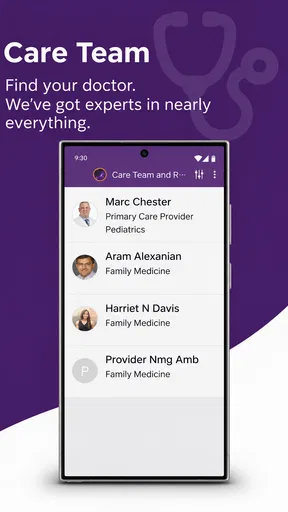
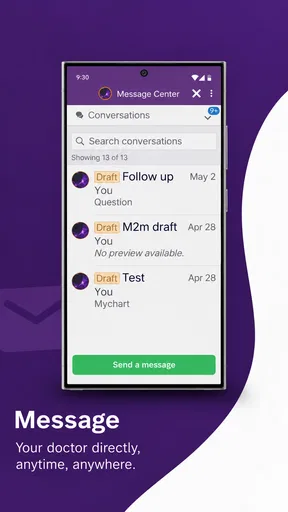
MyNovant’s communication purpose is useful for people who want a continuing connection with Novant Health rather than a single transaction. I like the idea of having a familiar place to return to after an appointment, especially when a question appears later and does not require emergency attention.
At the same time, I would not treat an app message as an instant response channel. Medical communication has different levels of urgency, and a patient needs to recognize that a mobile platform is not a substitute for emergency services or immediate clinical attention. The app works best for planned, non-emergency interaction, while urgent symptoms should be handled through the appropriate real-world channel.
Who will benefit most
I would recommend MyNovant to an existing Novant Health patient who wants a simpler way to manage routine care from a phone. It is especially suitable for people who regularly check results, arrange visits, or prefer digital access to their healthcare relationship. It may also help a family member who assists another adult with organization, provided that the account and access arrangements are handled appropriately.
I would be more cautious about recommending it to someone who expects a broad personal health dashboard covering every provider, pharmacy, wearable, and independent medical service. That is a different kind of product. MyNovant is more focused: its value comes from being connected to Novant Health, not from trying to become an all-purpose health archive.
Trust begins with the account, not the interface
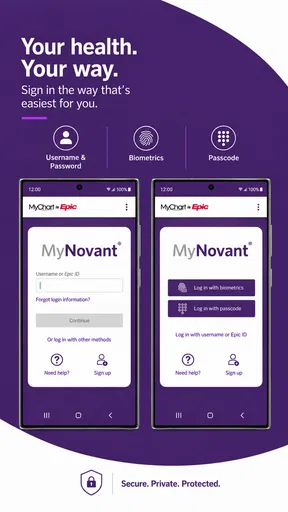
Healthcare apps ask users to place sensitive activity behind an account, so trust depends on more than clean navigation. I look for visible choices around signing in, reviewing information, managing access, and deciding what I do on a shared or borrowed device. Those choices are especially important when a phone is used by several people or when notifications could reveal private medical activity.
MyNovant should be approached with the same care I would use for any medical account. I would avoid leaving the account open on a public device, review what appears on the lock screen, and sign out or protect the phone when other people can access it. These are user-controlled habits rather than promises about the app, but they have a direct effect on privacy in everyday use.
I also appreciate that trust is not the same as convenience. A quick sign-in can be pleasant, but I would not weaken account protection merely to save a few seconds. The right balance depends on the device, the people around me, and how sensitive the information on screen may be.
Visible choices matter during sensitive tasks
The most sensitive moments are not limited to reading a result. They include opening a message in a crowded room, checking an appointment while someone is watching, or handing a phone to a family member for help. I would pause before displaying medical information in those situations and use the app when I have reasonable privacy.
Notification behavior deserves the same attention. A short alert can be convenient, but a detailed preview may expose more than I intended. I would review the phone’s notification settings and choose a level of detail that fits my circumstances. This is a concrete step that many users overlook because it sits in the device settings rather than inside the healthcare experience itself.
Another useful habit is to separate “I have received information” from “I understand what it means.” For results or clinical communication, I would avoid forwarding screenshots casually and would keep questions in the proper care channel. That preserves context and reduces the risk that personal information travels farther than necessary.
Account control is part of responsible use
When an app represents a healthcare relationship, I want to know that I can make deliberate decisions about access rather than treating the account as a permanent open window. I would periodically review who can use the device, whether saved sign-in details are appropriate, and whether an old phone or shared tablet still has access.
This becomes particularly important after changing phones, lending a device to someone, or ending an arrangement in which another person helped with appointments. The practical lesson is simple: account access should match the current relationship, not an earlier convenience.
For users who receive help managing care, I would recommend agreeing in advance about what the helper may view and what the patient wants to handle personally. A family member can assist with scheduling while the patient keeps control over sensitive conversations. That division is often more respectful and safer than sharing everything by default.
A realistic everyday scenario
Imagine that I have a routine appointment later in the week and notice that a test result has appeared. I open MyNovant at home, read the available information, and write down two questions rather than trying to interpret every detail immediately. I then check the appointment information, add the questions to my notes, and use the appropriate communication or scheduling route if the issue needs attention before the visit.
On the day of the appointment, I can review the details without searching through email or paper. Afterward, I return to the app when I have privacy, rather than opening a sensitive message while standing in a public line. This workflow shows where the app earns its place: it reduces scattered administration while leaving medical judgment with the patient and care team.
The scenario also shows the limit. If the result suggests an urgent problem, waiting for a convenient app interaction would be inappropriate. A healthcare app should support good decisions, not delay them.
How it compares with ordinary alternatives
The usual alternatives are calling a clinic, using a desktop patient portal, relying on email reminders, or keeping appointments in a personal calendar. A phone call can be better when the request is unusual or needs immediate clarification, while a desktop portal may be more comfortable for reading a large amount of information. Email and calendar tools can help with reminders, but they are not a complete substitute for a healthcare connection.
MyNovant’s advantage is concentration. It gives Novant Health patients a mobile starting point for several routine tasks, which is more coherent than maintaining separate notes and messages. Its disadvantage is the same concentration: if a person’s care is spread across multiple organizations, the app does not automatically become a complete record of everything medical.
I would choose a general health organizer when my main goal was combining information from unrelated providers or tracking lifestyle data independently. I would choose a phone call when urgency, complexity, or accessibility made an app workflow unsuitable. MyNovant is strongest in the middle ground: routine Novant Health administration that benefits from convenient mobile access.
Version, availability, and what to expect
The current version is 7.2.0, and the app requires iOS or Android 11 or later. That operating-system requirement is worth checking before installation, particularly if the phone is older or has not been updated in some time. The app is free to download, which removes a financial barrier, although normal mobile data or device costs still belong to the user.
MyNovant was released on November 19, 2020, and has grown to over one hundred thousand installs. Its average rating is 4.3 from around six hundred ratings, with just over three hundred written reviews. I treat those figures as useful background rather than a guarantee: healthcare experiences depend heavily on account status, provider relationship, device, and the specific task a person is trying to complete.
The Everyone age classification makes the app broadly approachable, but age suitability does not remove the need for adult judgment around medical privacy. A young person, caregiver, or dependent user may still need a carefully considered arrangement for account access and device notifications.
Where friction may appear
The main weakness is not that the app lacks a flashy feature. It is that digital healthcare can feel smooth only when the underlying account and care relationship are already in order. If information is confusing, a visit needs special handling, or access does not match the patient’s situation, the app cannot solve every problem by itself.
There is also a mental burden to constant availability. Having results and messages close at hand can encourage checking repeatedly, especially when I am anxious. I found it healthier to choose specific times to review routine information and to keep urgent concerns in the right channel. The app can make access easier, but I still need boundaries.
Some users may prefer a larger screen for detailed reading or a phone conversation for reassurance. That is not a failure of mobile design; it is a reminder that accessibility includes personal preference, eyesight, dexterity, privacy, and confidence with technology. A good healthcare routine may use the app alongside other forms of contact rather than replacing them.
My cautious recommendation
MyNovant is a sensible choice for Novant Health patients who want mobile access to results, appointments, and ongoing communication. I found its greatest strength in bringing routine care administration together without pretending to replace professional care. The free price and broad age rating make it easy to try, while the established user base suggests that it is serving a real need.
I would install it if my care was centered on Novant Health and I was comfortable managing a medical account on my phone. Before relying on it, I would update the device, protect the account, review notification previews, and decide which situations should go directly to a clinic or emergency service instead.
The best reason to use MyNovant is controlled convenience: easier access to your Novant Health routine while you remain responsible for privacy, interpretation, and choosing the right level of care. For that audience, it is a useful medical companion. For someone seeking a universal health-record hub or immediate answers to urgent symptoms, a different tool or direct professional help will be the better choice.
Pros
- Easy access to appointments
- test results
- and medical records in one place.
- Secure messaging makes it convenient to contact your Novant Health care team.
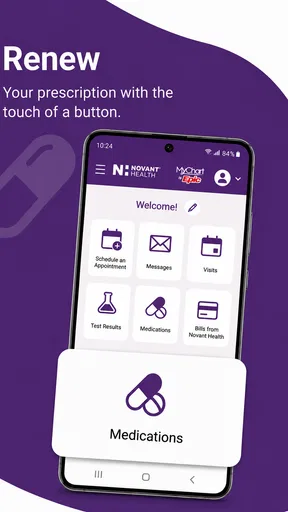
- Prescription refill requests can be submitted without calling the office.
- Appointment reminders help reduce the chance of missing scheduled visits.
- Supports virtual care access for eligible visits from a mobile device.
Cons
- Features are mainly useful for patients within the Novant Health system.
- Some functions may require identity verification or linked medical records.
- Appointment availability and options depend on each provider’s schedule.
- Notifications may be inconsistent if app permissions are restricted.
- The app offers limited value for users without an active Novant account.
FAQs for MyNovant
What is MyNovant, and what can I use it for?
MyNovant is the official patient app for Novant Health services. After signing in, users can typically review appointments, communicate with care teams, check test results, view portions of their medical record, request prescription refills, and manage billing information. The exact tools available may depend on your Novant Health location, provider, account status, and the way your records are connected.
How do I sign in or create a MyNovant account?
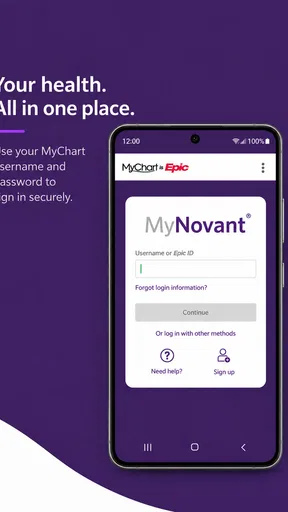
You generally sign in with your Novant Health patient portal credentials, rather than creating a completely separate account only for the mobile app. New users may be able to activate access using information supplied by Novant Health, such as an activation code or personal verification details. If you forget your password, use the recovery option in the app or contact Novant Health support for assistance.
Can I schedule appointments and communicate with my doctor through MyNovant?
MyNovant may allow you to request or schedule certain appointments, view upcoming visits, and send secure messages to eligible providers. Availability is not identical for every specialty or appointment type, so some visits may still require a phone call. The app is useful for routine communication, but it should not be treated as an emergency service or a substitute for immediate medical care.
Does MyNovant show test results, prescriptions, and medical records?
The app can provide access to available portions of your Novant Health medical information, including laboratory results, visit summaries, medications, allergies, and other record details. Results may not appear immediately because some information requires processing or clinician review. Prescription refill requests and medication lists can also depend on the prescribing provider, pharmacy, and whether the medication is managed within the Novant Health system.
Is MyNovant free, and is my health information secure?
MyNovant is generally available at no additional charge to eligible Novant Health patients, although normal mobile data charges may apply. The app uses account authentication and secure connections to help protect personal health information, but users should still keep the app updated, use a strong password, enable device security, and avoid signing in on shared or public devices. Always review the current privacy terms before use.


